Simplifying Linux diagnostics for
Turn a 10K file sosreport into a secure, shareable support case summary in seconds.
Key Benefits
Mitigating Common Pain Points
Privacy and Security First
Three simple steps to get the most out of a sos report
Secure by design, on SaaS and self-hosted alike
Every tier of sos-vault is built around encryption, isolation, and data minimization — whether we run it for you or you run it yourself.
Secrets encrypted at rest
Your licensing passphrase, 2FA secrets, and SIEM credentials are encrypted at rest — never stored or displayed in plaintext.
LUKS2 vault encryption
Vault contents live on independent LUKS2 volumes (AES-XTS-256) on SaaS and the licensed self-hosted tier, isolating every user's or team's data in its own container.
HTTPS everywhere
All web and API traffic is served over TLS, with a certificate ready at install time and swappable for your own.
Automatic housekeeping
Shared links, annotations, and audit entries carry expiry timestamps and are purged automatically on an hourly schedule. Your sosreports are never silently deleted — they're retained until you remove them.
Deletion on request
Ask, and we permanently destroy your vault and account — on SaaS or self-hosted.
AI Assistant runs local by default
Mil answers from an on-box model out of the box. Configure a cloud provider instead, and only the relevant portions of the current sosreport are sent to answer your question — nothing else leaves the system.
Built for air-gapped environments
Self-hosted sos-vault needs no internet access for day-to-day use — upload, decrypt, browse, licensing, and 2FA all work fully offline.
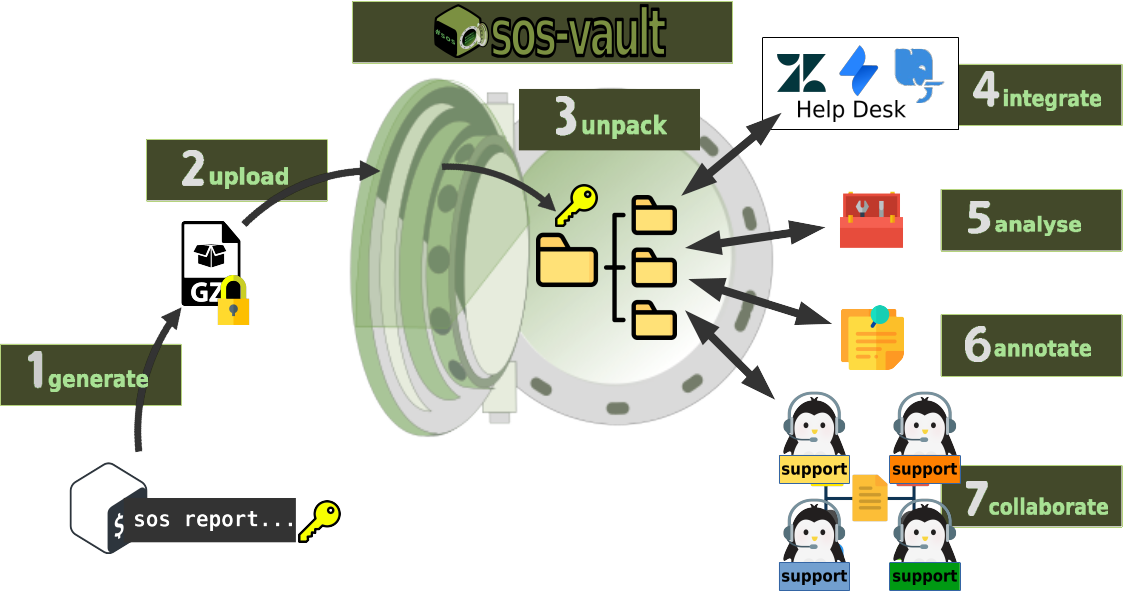
How does sos-vault Work?
Everything about the sos tool is in this link
You can annotate your findings, and share them with colleagues.
Mighty Analysis Tools
Real operational benefits

Streamline Troubleshooting

Secure Vault
Seamless Integration

Powerful Analysis Tools

Share your findings
Sos Report Compare

System Config Management

AI Assisted Analysis
Server Inventory
Run sos-vault on your own infrastructure
Air-gapped friendly. Plain-directory vault. Bound to one machine via the licensed
.lic file you receive at checkout. No telemetry, no phone-home.
Minimum requirements
- OS: Ubuntu 22.04+ or RHEL/Rocky/AlmaLinux 8/9
- RAM: 32 GB recommended
- CPU: 16 cores recommended
- Storage: a directory (default
/vault) with room for your cases - Network: inbound TCP 80 / 443
Download installation packages
Latest version 2.2.3
SHA256 4896f535e2411536b17d81830e06421bcc938c6e91c2623816598c33e77a1384
SHA256 475638bcfe8333c115b73843e24cd693164a48ae3d36c7ac3a1a459e56d49d12
The installer will walk you through 15 steps to bring the appliance online. Both packages run the same installer.
Source code
Security tooling has a high trust bar. We believe operators should be able to read every line of code that runs on their data plane, audit the encryption and data privacy logic, and run the product behind any firewall without ever calling home. The AGPLv3 license guarantees that — including for anyone who forks sos-vault and runs it as a hosted service.
GitHub pageOpen-core vs. licensed
The open-core baseline is free forever and fully functional for a single operator. A license unlocks the team features — multi-user, shared encrypted vaults, and integrations.
| Capability | Open-Core Free forever | Licensed Per-machine license |
|---|---|---|
| Full sosreport import & analysis pipeline | ||
| Local AI Assistant (bundled model) | ||
| Plain vault directory | ||
| Disk & Certificate Manager | ||
| Mail (SMTP) configuration | ||
| Users | Single admin | Up to seat cap |
| Teams / Groups (LUKS-encrypted vaults) | — | |
| Module installation | — | |
| ITSM integration (ServiceNow / Jira) | — | |
| SIEM integration (Syslog / ECS) | — | |
| Event Log (full audit trail) | — | |
| Cloud AI case analysis (OpenAI / Anthropic) | — | |
| Authentication & provider settings | — |
Plans built for Linux professionals and businesses of all sizes
2 months free — save up to 17% with an annual plan
Minimal
Access a few minimal basic features.
-
Team Size 1 member(Single person account.)
-
Vault Size 500 MB
-
Basic Tools
Basic
Access all the basic features.
-
Team Size 1 members(Single person account.)
-
Vault Size 5 GB
-
External ticket system integration access.
-
sos report command direct upload access.
-
Vault Increase Access
-
Basic Tools
-
Advanced Tools
-
Human email support
-
Configure your own OpenAI or Anthropic key for the AI assistant.
Team
Up to 8 members, access all our Features sharing the same vault.
-
Team Size 8 members(Team sharing the same vault.)
-
Vault Size 80 GB(Storage capacity per vault is 10 GB.)
-
External ticket system integration access.
-
sos report command direct upload access.
-
Vault Increase Access
-
Basic Tools
-
Advanced Tools
-
Human email support
-
Role based user administration panel.
-
Configure your own OpenAI or Anthropic key for the AI assistant.
-
Create alert rules evaluated automatically on every new sosreport upload, with in-app, email, event-log, and Slack delivery.
Enterprise
Up to 20 members access to all features in large shared vault.
-
Team Size 20 members(Team sharing the same vault.)
-
Vault Size 500 GB(Shared storage capacity.)
-
External ticket system integration access.
-
sos report command direct upload access.
-
Vault Increase Access
-
Basic Tools
-
Advanced Tools
-
Special Tools
-
Human email support
-
Role based user administration panel.
-
Configure your own OpenAI or Anthropic key for the AI assistant.
-
Create alert rules evaluated automatically on every new sosreport upload, with in-app, email, event-log, and Slack delivery.
Self-hosted
Full featured Self-hosted deployment for organizations requiring full data control and internal compliance.
-
Self-hosted base license 1 License
-
Team Size 2 members(1 admin + 1 user)
-
No enforced storage limits.
-
Customer portal access
-
External ticket system integration access.
-
sos report command direct upload access.
-
Basic Tools
-
Advanced Tools
-
Special Tools
-
Human email support
-
Role based user administration panel.
-
Configure your own OpenAI or Anthropic key for the AI assistant.
Extra seat
Extra user account for the Team / Enterprise / Self-hosted plans
-
Extra seat 1 members(Extra user account)