10. Comparing sos Reports.
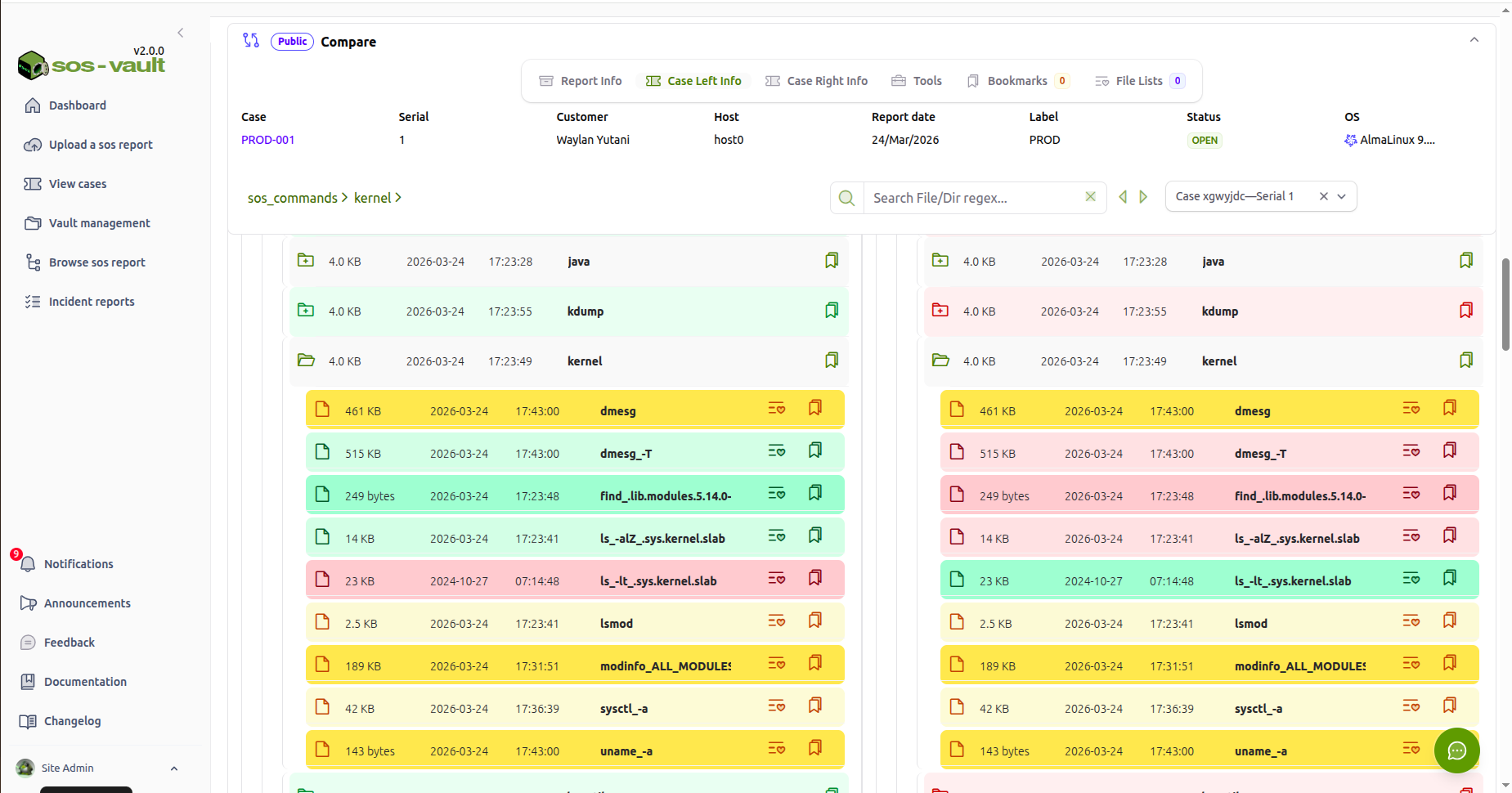
Keeping track of config changes, hardware/software, environment drift and more with a single command.
In Linux operations, most failures are not random. They are the result of change.
A configuration drift. A package upgrade. A kernel parameter adjustment. A new systemd unit. A subtle permissions modification.
The difficulty is rarely collecting system data. Tools like sos report already capture an exhaustive snapshot of a system’s state. The difficulty is determining what changed and whether that change explains the behaviour you are seeing.
Comparing sos reports converts raw system state into actionable deltas. For DevOps engineers, SREs, and senior sysadmins, that difference is material.
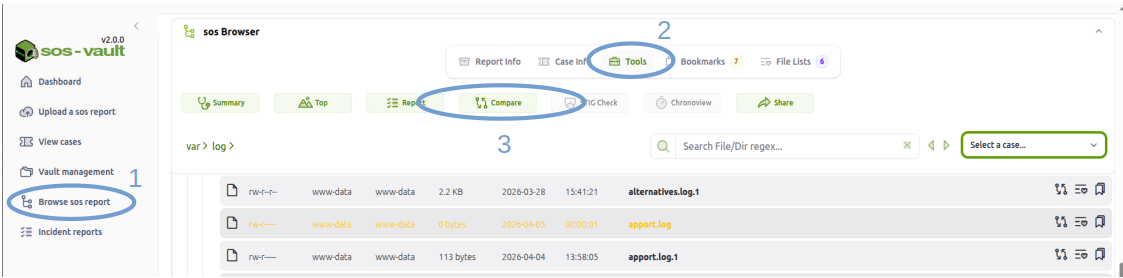
To launch the Compare tool in sos-vault just open an existing case:'
Browse sos report menu.
Tools
Compare
The Compare tool will be launched in the next tab.
Select the second case. And you are all set
The Core Problem: Static Snapshots vs. Change Detection
A single sos report answers:
What does this system look like right now?
In troubleshooting, that question is often insufficient. Systems rarely fail because of their current state in isolation. They fail because the current state differs from a previously stable state.
Comparison reframes the investigation:
What changed between “working” and “broken”?
That shift reduces cognitive load and accelerates root cause identification.
1. Pre- and Post-Change Validation
Planned changes introduce risk. Kernel upgrades, package updates, configuration modifications, or patch cycles all modify system state in ways that are not always obvious.
Comparing sos reports before and after a change window allows you to:
Verify only intended packages were modified (
rpm -qa,dpkg -l)Confirm sysctl values match design expectations
Validate systemd service enablement states
Detect unintended edits under
/etcConfirm kernel modules are consistent with requirements
Instead of manually inspecting hundreds of files and command outputs, you focus only on deltas. This transforms validation from a manual audit into a deterministic check.
For change-controlled environments, this is especially powerful. It provides defensible evidence that a system change did exactly what was planned — nothing more, nothing less.
2. Regression Analysis After Incidents
A common operational pattern:
System works at T1.
System fails at T2.
No one recalls a meaningful change.
Comparing sos reports from T1 and T2 frequently surfaces:
A new service enabled at boot
A modified systemd unit override
A changed mount option
A removed library
Altered file permissions
Updated SELinux policy state
Kernel parameter adjustments
Human memory is unreliable. System state is not.
When escalation occurs across support tiers, comparison reduces ambiguity. Instead of reading thousands of lines of logs, the investigation begins with a constrained diff set.
Mean time to resolution improves because engineers reason about change, not about static complexity.
3. Configuration Drift in Fleet Environments
In fleet-based environments, servers are expected to be consistent. Golden images, configuration management, and immutable infrastructure are designed to enforce uniformity. In practice, drift accumulates.
Manual interventions. Emergency fixes. Ad-hoc debugging changes. Package installs performed outside automation.
Comparing sos reports across supposedly identical systems exposes:
Package version divergence
Inconsistent sysctl values
Different service enablement states
Mismatched storage configuration
Divergent limits or ulimit settings
Drift detection is not merely hygiene. It explains asymmetric behavior across nodes in clusters, HA pairs, or load-balanced pools.
In distributed systems, small configuration differences frequently manifest as intermittent or partial failures.
4. Security and Integrity Analysis
When compromise is suspected, baseline comparison becomes critical.
A comparison against a known-good sos report can reveal:
Unexpected user or group additions
Modified sudo configurations
New listening services
Changed firewall rules
Altered file ownership or permissions
Suspicious systemd units
Modified kernel parameters
While sos reports are not forensic artifacts, they provide high-fidelity system state snapshots. The signal emerges when differences are isolated from noise.
Without comparison, investigators are forced to infer intent from static data. With comparison, the deviation itself becomes the primary indicator.
5. Performance Degradation Diagnostics
Performance issues are often misattributed to workload changes. In many cases, system configuration has shifted.
Comparison can surface:
CPU governor changes
I/O scheduler adjustments
NUMA configuration differences
Memory tuning modifications
Kernel parameter alterations
Systemd resource limit changes
Performance regressions frequently correlate with subtle tuning changes that are not logged in application logs. A delta-driven approach highlights these shifts immediately.
6. Upgrade Impact Assessment
Major OS upgrades introduce default changes and deprecations. For example, moving between major enterprise distributions or versions may alter:
Default sysctl values
Service naming conventions
Security policy defaults
Filesystem mount options
Systemd behaviors
Comparing pre- and post-upgrade sos reports provides an empirical view of what the platform changed.
This reduces reliance on release notes interpretation and exposes environment-specific impacts.
7. Cluster and High Availability Consistency
In clustered systems — database clusters, HA pairs, container nodes — uniformity is assumed.
When one node behaves differently, comparison often reveals:
Divergent package versions
Different kernel minor versions
Missing kernel modules
Inconsistent mount flags
Different SELinux states
Subtle mismatches frequently explain asymmetric failures. Comparison transforms troubleshooting from guesswork into verification.
8. The Strategic Value: Change as First-Class Data
Modern DevOps culture emphasizes observability, automation, and reproducibility. Yet system-level state change is often under-instrumented.
Comparing sos reports operationalizes change detection at the operating system layer.
Instead of parsing logs reactively, you:
Treat system state as structured data
Identify deltas programmatically
Feed differences into automation pipelines
Correlate change magnitude with incident impact
Build pattern libraries of recurring failure signatures
For SRE teams, this aligns directly with reliability engineering principles. Failures are modeled as state transitions. Comparison reveals those transitions.
Available Tools for Comparing sos Reports
The method matters, but so does tooling. The effectiveness of sos report comparison depends heavily on how differences are surfaced and structured. Below are the primary categories of tools available today.
1. Purpose-Built sos Comparison Utilities
sosdiff
Purpose-built tools such as sosdiff (part of Oracle’s Linux support tooling) are designed specifically to compare two sos report directories.
They typically:
Understand sos report internal structure
Compare packages, sysctl values, services, kernel modules, hardware data
Group differences by subsystem instead of raw file paths
Provide human-readable summaries
This category is appropriate when:
You want structured comparison without building custom parsers
You are comparing two specific snapshots (e.g., before/after change)
You need quick operational answers
The limitation is that these tools are usually optimized for pairwise comparison rather than timeline management or multi-version analysis.
2. Visual Directory Comparison Tools
General-purpose directory comparison tools remain highly practical, especially when reports are unpacked.
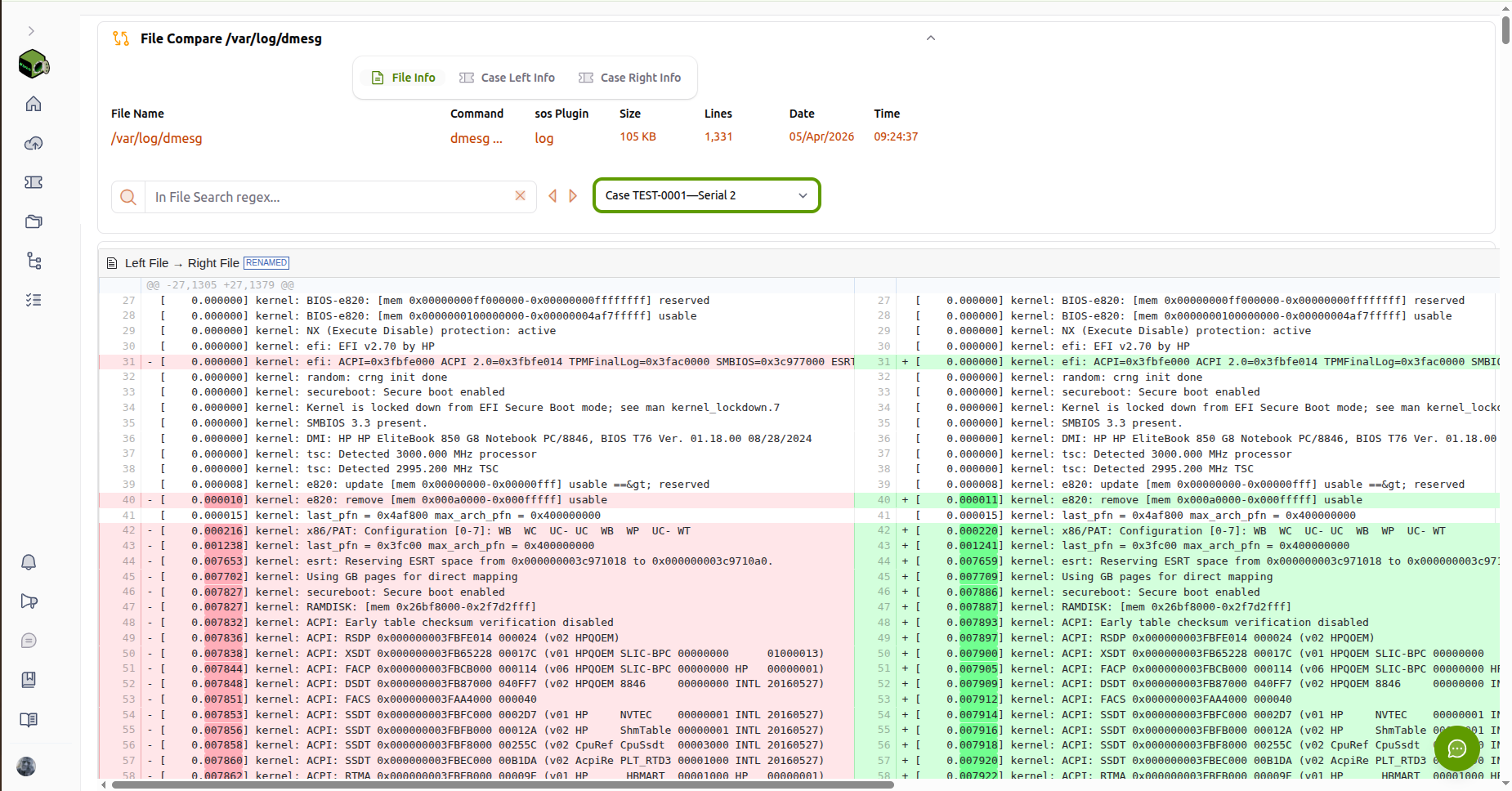 sos-vault FileCompare tool on /var/log/messages
Examples include:
sos-vault
Meld
Beyond Compare
VS Code diff mode
Git-based comparisons
These tools provide:
Side-by-side directory comparison
File-level highlighting
Interactive navigation
Merge and inspection capabilities
For engineers who prefer exploratory analysis, visual tools allow rapid inspection of:
/etcdifferencessystemd unit changes
Package list modifications
Storage configuration changes
Including sos-vault in this category extends visual comparison beyond raw directory diffing. Instead of comparing archives locally, reports can be:
Indexed
Stored chronologically
Compared semantically
Filtered by subsystem
Managed across multiple versions
This shifts comparison from a one-time troubleshooting action to a managed operational workflow.
3. Standard CLI Diff Tools
Traditional UNIX utilities remain effective:
diff -ruNsdiffcolordiffrsync --dry-run
These tools are:
Scriptable
Lightweight
Suitable for automation
Effective for focused comparisons (e.g., only
/etc)
However, they operate at the file level and do not interpret sos report semantics. They require filtering and normalization to reduce noise.
4. Custom Structured Comparison Pipelines
Advanced environments often implement parser-driven comparison workflows:
Extract package lists into structured maps
Normalize sysctl key-value pairs
Model services as structured objects
Represent filesystem trees as hierarchical JSON
This enables:
Drift scoring
Change magnitude metrics
Timeline comparison
Automated anomaly detection
For SRE teams, this approach integrates naturally into CI/CD pipelines, compliance systems, or reliability analytics.
Selecting the Right Approach
The appropriate tool depends on context:
Quick, one-off troubleshooting: sosdiff or a visual diff tool.
Manual exploratory analysis: Visual directory tools or sos-vault.
Automation and drift detection: Structured parsing and scripted diffs.
Multi-version lifecycle management: Platforms that support indexed storage and semantic comparison.
The maturity of your comparison tooling should reflect the maturity of your operational model. In environments where change drives failure, sos comparison is not merely diagnostic — it becomes a core reliability control.
Conclusion
A single sos report describes a system.
Two sos reports describe a transition.
In operational engineering, transitions explain behavior. They expose risk, validate change, and accelerate troubleshooting. For Linux DevOps, SRE, and infrastructure engineers, systematic sos report comparison is not merely convenient — it is a method for converting system complexity into structured, actionable insight.